


When data is subject to random error, or when there are many data points and it is desirable to approximate the data by a simple function, least squares approximation is used.

 Create a new file called lsquare.m.
Imagine that data in a `perfect' experiment has
the form
 .
Generate data with this `perfect' form at points
.
Generate data with this `perfect' form at points
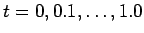 . In a
real experiment, such perfect measurement is not possible, and typically
there is some random error. To simulate such errors, we
can use the random number generator available in MATLAB. The
command
. In a
real experiment, such perfect measurement is not possible, and typically
there is some random error. To simulate such errors, we
can use the random number generator available in MATLAB. The
command
ynoisy = y + randn(1,11) will add
normally distributed random
noise, with mean zero and variance one, to our data.
Plot
y and
ynoisy against
 .
.
 Now use the MATLAB commands
c2 = polyfit(t,ynoisy,2); y2 = polyval(c2,t) ;
to generate a least-squares quadratic fit to the noisy data. Plot this
on your graph as well. How good is the fit? In a new figure plot the
error, given by
abserror = abs(y -y2) .
Try the experiment again, but
this time reduce the noise level by a factor of ten.
Note that even
a moderate amount of noise can affect the accuracy of the least
squares fit to the experimental data quite significantly.

 Give the values of the maximum absolute error for the two cases treated above (use a column vector).